dev blog · · design
fictty: splitting out the layer agents build on
After an agent demo that went badly, we argued through what the layer under our apps should be, what agents actually need from it, and how it talks to them. Then we gave it a name.

The fictty wordmark. It isn’t set in a font: each letter is drawn on a terminal grid, and each stroke is a pane of tinted glass, generated fresh from a seed.
The last two posts covered a terminal UI that is one value and the tools around it. This one is the conversation that came after, and the decisions it produced. It’s written as it happened: a question, a pushback, and where we landed.
The demo that started it
In another project, ownpurse, we asked an agent to walk us through its new data model in a live terminal UI. The only live surface it had was caretline, the editor engine under thc, so it used that. It wrote each chapter as a Markdown document and watched what we typed on the first line.
It worked, and it was a poor experience. A text editor has no menus, lists or tabs, so typing
next was the menu. Worse, every keystroke went through the model: we typed, the agent
noticed, thought, and rewrote the page. It was slow, and the fix it improvised was a shell loop
polling the document.
The agent did nothing wrong. It had the wrong material. What it needed was the thing we’d just built: a screen it describes once as data, where navigation runs locally and only the interesting moments come back to it.
Three layers
So the scene experiment becomes its own project, and the stack gets a clean cut:
| layer | owns |
|---|---|
| caretline | text: the editing engine, callouts and tours |
| fictty | the UI runtime: a UI as one value, the Elm loop, primitives, data sources, the socket, pixels, later history |
| apps | thc, ownpurse and anything else: their data, their commands, their screens |
The code already falls along this line: the prototype never depended on thc. thc becomes one app among several, built on the same layer as everyone else’s.
Do agents even need components?
The question we argued longest: if agents write code this well, should they get lower-level
building blocks? People needed <DatePicker> because assembling one by hand is tedious. An
agent doesn’t mind assembling. Maybe agents just need lines and boxes, the way raw CSS has
started to make sense again next to utility frameworks.
That turned out to be half right.
Right about drawing. Our own demos proved it. Rebuilding thc’s Today screen exactly, cell for cell, needed no special row component, only styled text and templates. The progress ring was SVG with one number filled in. A dropdown is a callout plus a list. There’s no reason for a zoo of widgets.
Wrong about behaviour. Lines and boxes don’t scroll, select a row, draw 50,000 rows in a fraction of a millisecond, edit text or know which pane has focus. A pushed UI is data, never code, so the runtime is the only place behaviour can live. Components exist there for behaviour, not to spare anyone the work.
Two more things pushed us toward a compact vocabulary:
- Tokens are the agent’s real cost. One published measurement: generating a dashboard in a verbose JSON format took about 46,000 tokens and 40 seconds; a compact format cut that about 30× in tokens and 300× in latency. Lower-level means more tokens per UI and bigger patches.
- The agent reads its own UI back. “Select row 3 of positions” only works if the UI knows what a row is. Boxes and lines lose that.
The stack we agreed on
 assembly            the UI value: what goes where, bound to what data
 theme               the look: tokens, type, a skin for every primitive
 project components  compositions as data, built once per project
 alphabet            primitives with behaviour, maintained by us
 escape hatch        a custom widget in Rust, compiled into the app
- The alphabet is small: list and table, input and textarea, tabs, text, layout, layers, pixels, and keys, clicks and focus for every node. Everything else is composed.
- The theme is data, part of the state, so an agent can push it, patch it and later rewind it like anything else. It owns the look; layout stays with assembly, so changing the theme never moves anything.
- Project components are where “build it once, then assemble” happens. An agent builds a project’s design system once (its KPI card, its row style) as JSON with named parameters, and every screen after that is short. They stay substitution only; once a component language grows loops and conditions, it has turned into a programming language.
- Assembly is what an agent writes most of the time. This is the layer A2UI describes, so an A2UI adapter maps onto it without a new stack.
- The escape hatch is for real new behaviour, like a calendar with its own key navigation. The
agent writes the widget in Rust and rebuilds the app. The prototype already has
upgrade, which execs a new binary and keeps the screen’s state, so a rebuild doesn’t even close the screen.
Patterns move down over time: a recipe that keeps recurring becomes a component, and a component that needs new behaviour gets proposed for the alphabet.
Layout will use a flexbox subset, through taffy, rather than our own constraint system: agents already know flexbox from the web.
Isn’t this just ratatui?
No, and it sits on ratatui rather than competing with it.
ratatui is immediate mode. Each frame, the whole screen is drawn into a buffer of cells, and ratatui compares it with the previous frame’s buffer and sends only the cells that changed. That cell diff does the job a virtual DOM does in a browser, and it’s cheap: a full screen is about 12,000 cells. So pushing a whole new UI costs no more than drawing a frame, and only what changed reaches the terminal.
What ratatui deliberately leaves to each app is exactly what fictty adds: an event loop, focus, mouse hit-testing, data binding, a theme system and text input. A primitive is a ratatui widget plus those. Where a ratatui widget fits, we use it; we write our own only for behaviour or speed (the prototype’s list draws only visible rows, which is how 50,000 rows stay fast).
Diffing still matters in a few places, and those are fictty’s job: view state survives a push by node id (selection, scroll, a half-typed field), images are cached by content, and a push should keep any data source whose definition didn’t change. The prototype restarts every source on a push; that’s a fix the extraction makes.
What about a text field?
ratatui has no input at all. Community crates exist (tui-input, tui-textarea), but their
state is hidden inside Rust objects, so you can’t serialize it, replay it or let an agent drive
it.
caretline already supports a one-line mode for exactly this: a filter box, a prompt, a form field. The worry was weight. But the weight is code size, paid once per binary; each field is a small state (a short rope, a caret, a capped undo history), so a form with a hundred fields is well under a megabyte. In exchange, every field edits the same way thc’s editor does, and its state can be recorded and replayed like everything else.
CLI, skill or MCP?
How agents should reach the runtime is a live argument in the field, so we sent a research agent to collect the strongest case on each side.
For CLIs: models already know the shell, pipes keep data out of the context, --help loads
nothing until it’s needed, and you can debug by re-running the exact command
(Holmes,
Ronacher,
Zechner). Popular MCP
servers cost tens of thousands of tokens in tool definitions before a single call.
For MCP: most places agents run have no shell; MCP brings OAuth, per-tool permissions and audit for teams; typed schemas mean fewer malformed calls; and state is native. The context cost has been largely addressed: Anthropic’s tool search cut one measured setup from 77K to 8.7K tokens (Anthropic), and code-mode approaches go further. In one benchmark on GitHub tasks, correctness was about the same across MCP, skills and a bare shell, but on the hardest tasks MCP cost more than 6× as much (Arize).
Opinion is converging on “both, by context”: a CLI and a short skill where the agent has a shell; MCP for chat apps, remote services and teams; and in either case a few well-designed tools, not one per endpoint.
For fictty that means, in order:
- The CLI plus a short skill: the primitives, a full example to copy, and the rules that
matter (“check your work with
screen”, “bind data to commands; never relay it yourself”). - A
watchoperation, so an agent can wait cheaply for the person to submit a question or click a button. That was the one thing the ownpurse demo did well. - MCP later, as a thin adapter over the same socket, for hosts without a shell and for returning the screen as an image.
The name
We wanted a name that says the material, not the mechanism. Fictile means “capable of being moulded; made of clay”. fictty is fictile plus tty, the terminal: something you shape quickly, on the terminal’s grid. (It was also free on crates.io, GitHub and all three domains we checked, which most dictionary words weren’t.)
We tried two identities, both generated rather than typeset. The first threw each letter in clay, which you could fire from wet to bisque until it set into terminal cells:
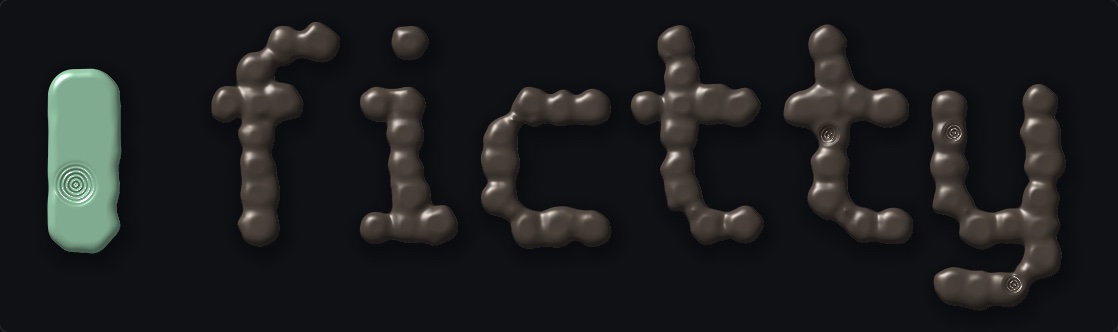
The clay direction. It renders well, but clay is heavy and slow, and it read more craft shop than terminal.
Clay is heavy, and this layer’s whole point is speed. So the identity asks what clay would be like as a gas, and answers with glass: every stroke a tinted pane, overlapping like the panes and layers of a terminal UI, mixing where they cross, rushing in and condensing in under half a second. That’s the direction we’re taking forward.
Next
- Extract the prototype into its own repo and crate,
fictty, with generic examples; thc’s Today look-alike moves to thc as a consumer. - Add
inputandtextareaon caretline, awatchoperation, and source diffing on push. - Write the skill.
- Rebuild the ownpurse walkthrough on it, as the test that started all this.